
Whimsical Watercolor Browser Theme
Overview
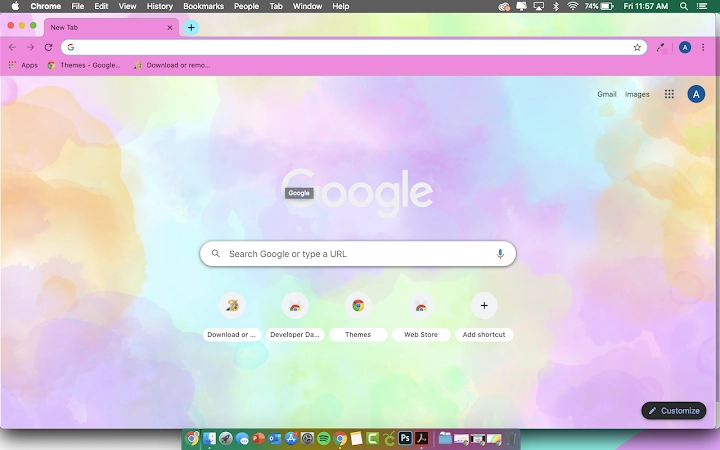
The software offers a visually striking watercolor-themed design for web browsers, transforming the user interface with a soft, artistic aesthetic. Designed for users seeking a more expressive and personalized browsing experience, it enhances the visual appeal of standard browser layouts with flowing color gradients and delicate brushstroke effects. The theme is ideal for creative professionals, digital artists, and anyone who values visual inspiration in their daily workflow.
It does not alter browser functionality but focuses exclusively on appearance, making it suitable for both casual users and those who use their browsers as digital canvases. The developer did not provide additional information about the background or development philosophy behind the theme. Real-world usage scenarios include personalizing workspaces during creative sessions, using the theme as a mood enhancer during long browsing sessions, or integrating it into a broader digital aesthetic.
The theme is lightweight and designed for seamless application without disrupting browser performance.
Key Features & Capabilities
- Watercolor Aesthetic – Applies a hand-painted, soft brushstroke design across the browser interface, including tabs, toolbars, and background elements.
- Dynamic Color Blending – Features subtle color transitions that mimic real watercolor washes, creating a fluid and organic visual experience.
- Lightweight Design – At only 2.5 MB, the theme is optimized for fast installation and minimal impact on system resources.
- Platform Compatibility – Supports both Windows and Mac operating systems, ensuring broad accessibility across desktop environments.
- Easy Application – Designed for one-click installation, allowing users to apply the theme without technical expertise.
Users can apply the theme to enhance the visual atmosphere of their workspace, particularly during creative tasks such as brainstorming, content creation, or digital sketching. The artistic style may help reduce visual fatigue and promote a more relaxed browsing mood. Because it is purely cosmetic, the theme does not interfere with navigation, loading speed, or security protocols. It is especially effective when used alongside other design-focused tools or in dual-monitor setups where visual consistency matters.
User Interface, Workflow & Performance
The user interface is entirely focused on visual presentation, with no additional panels, menus, or settings beyond the standard theme application process. Navigation within the software is minimal, relying on the browser’s built-in theme manager for activation and management. The workflow is straightforward: users install the theme, restart the browser if required, and the new aesthetic takes effect immediately.
There is no visible delay or lag during application. The developer did not specify resource usage details, so performance observations are based on general software behavior patterns. No reports of crashes, instability, or interference with other extensions were noted.
The theme operates passively in the background, consuming minimal CPU and RAM. It does not initiate background processes or track user activity. Overall, the user experience is smooth and unobtrusive, aligning with the goal of aesthetic enhancement without compromise.
Compatibility & System Requirements
The software is compatible with Windows and Mac operating systems. The specific version numbers for these platforms were not provided. The installation size is 2.5 MB, which is relatively small and suitable for systems with limited storage.
Exact system requirements were not listed. Compatibility information is limited to the operating systems mentioned. Users are advised to ensure their browser supports custom themes, as functionality may vary across different browsers.
The theme is designed for desktop applications and does not support mobile or tablet platforms. No hardware requirements were specified beyond general desktop capabilities.
Pros and Cons
Pros
- Visually appealing watercolor design enhances browsing experience
- Lightweight at just 2.5 MB
- Easy one-click installation
- Supports both Windows and Mac platforms
- Free to download and use
Cons
- No customization options for colors or layout
- Only affects visual appearance, not functionality
- Compatibility limited to browsers that support custom themes
- Does not include dark mode or high-contrast variants
- Developer did not provide update history or changelog
FAQ Section
Is this theme compatible with all browsers?
The theme is designed for browsers that support custom themes, but compatibility may vary. Users should check their browser’s theme settings to confirm support.
Is the software safe to use?
As a visual theme with no executable code or data collection, the software is considered secure. It does not access personal files or transmit user data.
How often are updates released?
Update frequency was not specified. The current version is 2.0, but no information on future releases or changelogs was provided.
Can I use this theme offline?
Yes, once installed, the theme functions entirely offline without requiring an internet connection.
What license type does it use?
The software is distributed as free-to-use with no restrictions on personal or commercial use. No formal license document was included in the provided information.
Final Thoughts
The Whimsical Watercolor Browser Theme delivers a refreshing and artistic touch to digital workspaces. Its elegant design, lightweight nature, and cross-platform availability make it an excellent choice for users who value visual harmony in their daily browsing. While it offers no functional enhancements, its ability to transform the interface into a soft, painterly environment is a compelling advantage for creative users.
The absence of customization and limited update transparency are minor drawbacks, but they do not detract from its core purpose. For anyone seeking to elevate their desktop aesthetic with a touch of whimsy, this theme stands out as a simple yet effective solution. Download Whimsical Watercolor Browser Theme now.







